

A WordPress trial can do all the hard work of convincing a customer that your service is worth keeping. The site is already running, the customer has had time to use it, and the decision to stay may be one click away. That is exactly when an extra billing detour can become much more expensive than it looks.
PanelAlpha v1.9.8 brings Stripe much closer to that moment. Background Billing is now Direct Billing, with Stripe joining WHMCS as a billing integration and giving providers a more direct way to move customers from trial to paid. Trials, paid plans, invoices and subscription changes can now stay much closer to the WordPress service customers already manage in the Client Area, instead of sending them through an entirely separate billing experience when they are ready to continue.
WHMCS remains firmly in place for providers who rely on it. The difference is that Stripe can now work alongside it or take over selected billing flows where a shorter route from WordPress service to payment makes more sense.
Direct Billing with Stripe
Direct Billing with Stripe integration is the number-one feature of PanelAlpha v1.9.8 because it targets one of the most decisive points in the customer journey: the moment when a working WordPress trial needs to become something the customer is willing to pay for.
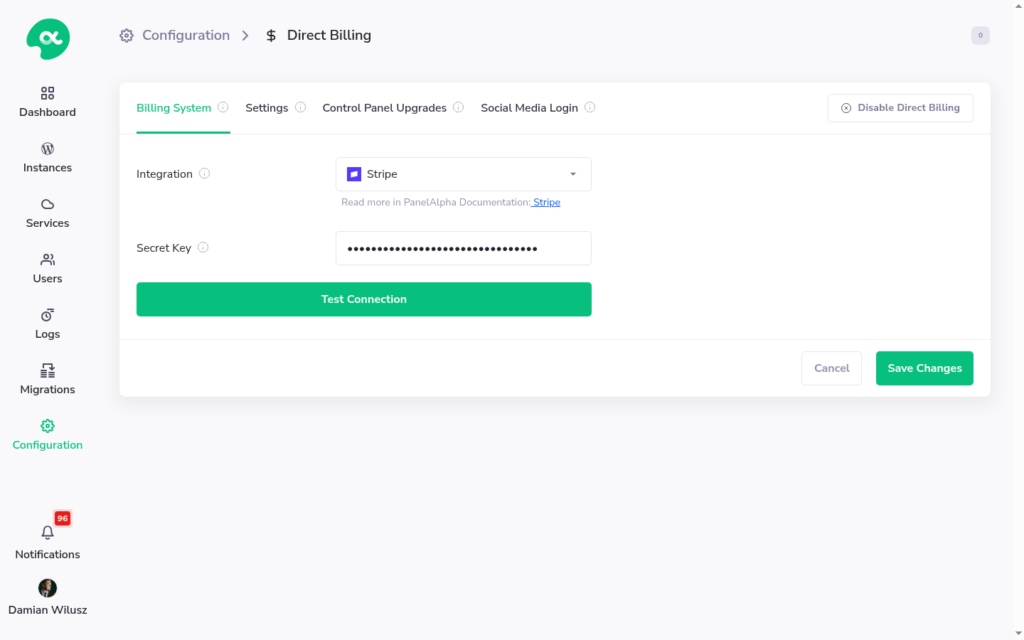
What this puts in your hands
- Trials with a registration link, duration, reminders, and an upgrade URL
- Paid plans mapped to a Stripe product
- Trial-to-paid and paid-to-paid upgrades
- Invoices in the Client Area, including Pay Now for unpaid invoices
- Subscription cancellation through Stripe
PanelAlpha does not try to swallow your checkout or dictate how you sell. Your order form and upgrade page remain on your end, whether you use a Stripe Payment Link, Pricing Table, or another flow built around your business. Once Stripe confirms the payment, PanelAlpha picks up exactly where it needs to: creating the account, assigning the right plan, or moving an existing service forward.
That split keeps the commercial side flexible without breaking the connection to the service itself. Pricing and checkout stay under your control, while provisioning, invoices and the WordPress environment stay where the customer already expects to find them. Instead of forcing a trial user to mentally switch from using their website to dealing with another billing system, the path to paid becomes a much more natural continuation of the same experience.
The trial flow makes that difference especially clear. A customer opens your trial registration URL, creates an account and receives a WordPress site for the number of days you define. PanelAlpha can remind them before the trial expires and, when they are ready to continue, send them to your upgrade URL with the relevant service details already attached. They choose a paid plan, complete the payment in Stripe, and the WordPress service they have already been using moves forward with them.
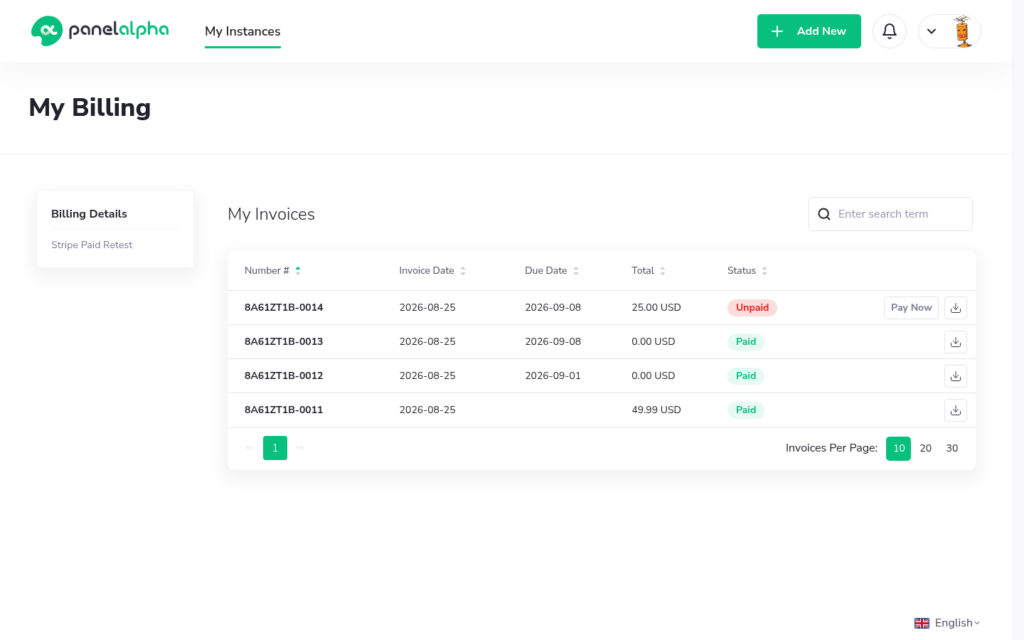
Paid orders work the other way around. A customer completes the purchase in Stripe first, after which PanelAlpha creates the corresponding user and WordPress service on the mapped plan. From there, the billing connection continues through the subscription lifecycle. If a paid service becomes overdue, PanelAlpha can suspend it and later remove it according to the timing configured for that plan.
In other words, Stripe does not simply appear at checkout. It becomes part of the route that carries a WordPress customer from the first trial to the ongoing paid service.
Key takeaway:
Direct Billing with Stripe keeps the path from WordPress trial to paid in one connected flow, without pushing customers into a second billing panel for invoices or subscription changes.
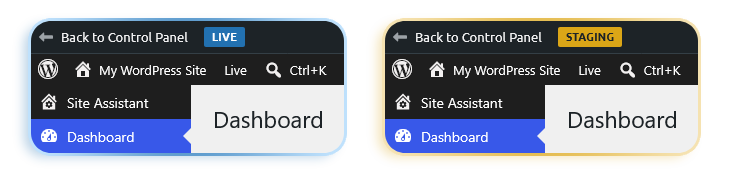
Live and Staging labels in WordPress admin
Some costly mistakes begin with the simplest possible mix-up: opening the wrong WordPress environment and realizing one edit too late that you were working on Live instead of Staging.
Version 1.9.8 tackles that deceptively simple problem by adding Live / Staging labels directly inside WordPress admin. Customers no longer have to rely on memory, URLs or a quick double-check before making a change. The environment identifies itself where the work actually happens.
Practical improvements from production use
PanelAlpha v1.9.8 also packs a set of fixes and small features that came from tickets, not a roadmap slide.
| Backups | Backup health is easier to see from the Admin Area dashboard. If automatic backups stop for a stretch of time, you get a count and a list instead of finding out on a single instance weeks later. |
| Migrations | FTP and database passwords in Migrations history are masked. |
| Fastly CDN | DNS instructions for Fastly CDN show the records customers should actually set, rather than the origin server IP. |
| Share User | Share User invitation links no longer fail with an Invalid Invitation error. |
| White-label | White-label coverage is tighter in plugins and WHMCS errors. |
Migration and WP Cloud login issues from this cycle are in the changelog as well, along with update stalling, CSF management, and plugin deactivation errors.
Keep the momentum all the way to paid
A successful WordPress trial has already done most of the convincing. The last thing you want is to lose that momentum when the customer is ready to stay. With Direct Billing and Stripe, PanelAlpha keeps the path from trial to paid service connected, making conversion the natural next step rather than the start of another process.
For hosting providers, that means more than a cleaner checkout flow. It means fewer reasons for clients to drop off, more room to turn trials into revenue, and a WordPress hosting experience that can compete on convenience as much as price or features.
PanelAlpha v1.9.8 also brings a long list of smaller changes focused on the parts of real hosting workflows that tend to create extra work. Take a look through the changelog and see what else just got out of your way.




Comments